

🔒 Protected Project
Please enter the password to view this content.
Sensium AI
Overview
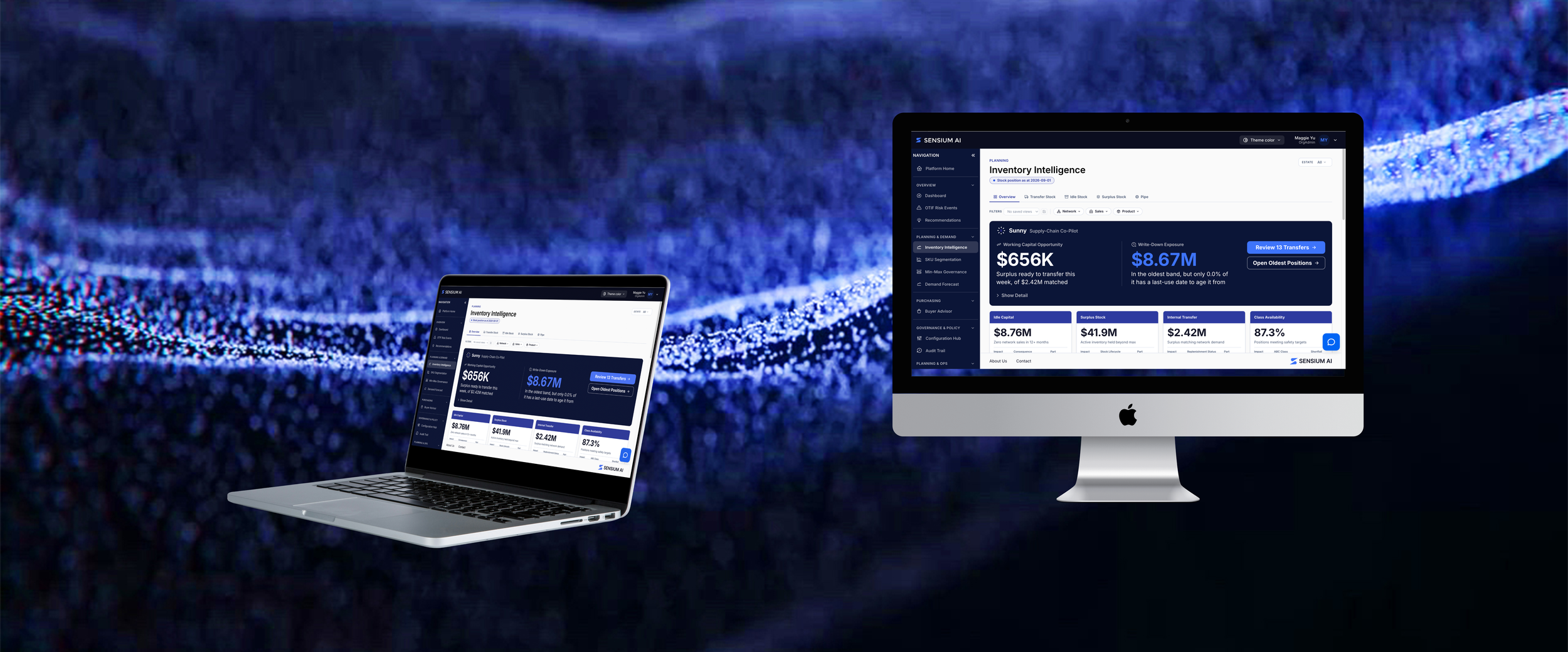
Sensium AI is an enterprise-grade AI decision and automation layer that integrates directly on top of legacy ERP systems (SAP, Oracle, Dynamics 365) for complex industrial manufacturers and distributors. Our clients want to use Sensium AI and the features that it has to hold their data. As Lead UX/UI Designer, I spearheaded the end-to-end design process across the features Sensium Stack, the Sensium X Command Center, and Sunny, an AI co-pilot designed to convert fragmented supply chain data into predictive, auditable workflows across demand, inventory, and purchasing.
Problem
Legacy ERP systems overwhelm enterprise supply chain planners with millions of data rows, forcing them into highly reactive, manual workflows. Sensium AI set out to streamline this experience by providing clear, data-driven visual interfaces. As the product evolved, the core UX challenge was balancing rapid, client-driven feature requests while maintaining a cohesive, user-friendly interface.
Solution
To address the shifting client data requirements, I led the UX strategy by introducing a rigid design validation process. Instead of treating weekly client requests as ad-hoc changes, I created an adaptable UI framework for the Sensium AI platform that could ingest shifting data structures without compromising usability. I partnered closely with the development team, translating client feedback into precise, actionable design specifications, and systematically pushing forward iterations that balanced client expectations with technical feasibility.
Role
UI/UX Design Lead
Design Process
To differentiate Sensium AI from cluttered legacy tools, I conducted a feature-flow and navigation benchmark study across major supply chain competitors. This research allowed us to identify market gaps and strategically focus our product roadmap on cognitive clarity.
By dissecting these competitor flows, I identified critical feature gaps and mapped out a streamlined navigation paradigm that eliminated visual clutter for our users. Moving into the implementation phase, I acted as the bridge between design and engineering. I embedded directly into the engineering workflow, building and validating UI iterations locally on a local host server, managing updates via Git feature branches, and deploying code directly to the main production pipeline. This end-to-end integration allowed me to run real-time design validation, testing for clicking efficiency, layout clarity, and UI fidelity to ensure a frictionless production release.
Timeline
Empathize
Focused Research Goals:
Enterprise Supply Chain Intelligence & AI Co-Pilot Platform
Implementing AI:
Be able to design with AI and edit before confirming that changes
Before starting to design the Sensium platform I began doing research on different competitors similar to the goals of Sensium. We also had meetings with our clients to see what they were looking for in our platform. Then after gathering the data we moved forward to defining the UI.
Research Findings
I found common themes of how certain platforms worked and what users want
Planners don't want another disconnected tool; they need clear, prioritized actions.
A clear design can easily display mass data that is given.
Speed to value matters; the interface must be easy to understand for rapid onboarding (8–12 week client implementations).
Competitor Research
Define
The definition of Sensium is an enterprise AI decision and automation layer that sits directly on top of legacy ERP systems (such as SAP, Oracle, Microsoft Dynamics 365, and Infor SyteLine). To design effectively for this ecosystem, our UX strategy relies on a deep understanding of complex data schemas and legacy system behaviors. We bridge the gap between heavy enterprise data capabilities and the end-user's cognitive load, ensuring that every platform iteration we design is both technically accurate and highly intuitive to navigate.
Key Words: AI, Systems, Organization
Sunny Card
Sensium wanted their brand to be specifically different than other companies that use AI in their system. They wanted their native natural-language AI co-pilot assistant to be named “Sunny”. When it came to the Sunny Card we wanted to be clear and bring specific points to the clients that are holding their information.
Sensium AI Branding
Sensium AI had a clear focus of how to be clear in their branding and to make it different from any other competitors. Using the existing logo we enhanced the logo into the general UI Kit.
Designing Dashboard
Clients will have data given to us and it is for us to be clear and fast with how to display the information that is given to us. This would mean we are designing new screens and as a team validating the information and finalizing on which one to present.
-
Brand Style Guide
I created a new brand style guide with all the UI elements
Ideate
During the ideation phase, I focused on turning complex supply chain data into high-density visual layouts. Synthesizing competitor research, I wireframed dashboards for the Sensium X Command Center and designed transparent interaction patterns for Sunny AI (chat and card) ensuring automated purchase and truckload drafts were simple to inspect, edit, and approve. Working directly alongside our dev team on local host, we rapidly prototyped and validated responsive UI components, ensuring seamless design-to-code fidelity before pushing feature branches to the main environment.
Key Ideas
Competitive Analysis & Screen Mapping
Audit competitor UI flows to extract interaction patterns and eliminate legacy friction.
Local host Component Prototyping
Build and stress-test high-density design layouts directly in a local development environment.
Branch Management & Main Deployment
Commit polished UI code to feature branches, conduct code/design reviews with dev leads, and merge to the main dev environment.
UX Wireframes
Prototype
The goal with the Prototype is to use AI to be able to design on the Local host that was set up as I worked with the dev team. Within the prototype I would adjust the pages and test out the clickability and overall consistency of UI.
Steps
Added new features on pages : Sunny AI Co-Pilot, Command Center Layout, Daily update and changes as data changes
Created high-fidelity prototypes with local host
Dev-Integrated Testing : Tested UI components directly in code on local host to validate high-density table interactions, dark/light contrast, and data visualization performance before branch deployments.
Work on changes pages and now added pages (Dashboard, Inventory Intelligence, Min-Max Governance, Demand Forecast, Buyer advisor, Configuration Hub, Network View, etc)
Local Host Prototype
Testing Process
Task
Continue to follow up with updates that are needed to be done.
Challenge
Some users will not be happy with the design and being able to adjust and accommodate with the needs.
Reflection
Sensium is now set with their brand and when it comes to applying to their clients the whole team is able to speedily get it done.
This is an active, multi-phase initiative. The case study below outlines completed foundational milestones, with further iterations currently in active development.
Reflections
Future Steps
I am continuing to edit day to day corrections of the UI based off of the clients data that is sent.
New AI world
With the trend of AI and Design I was able to work with Sensium AI to be able to build a smooth and clear platform. Being able to start from scratch in organizing the UI for Sensium AI helped build a firm foundation with moving forward and designing prototypes with AI.