

Sensium AI
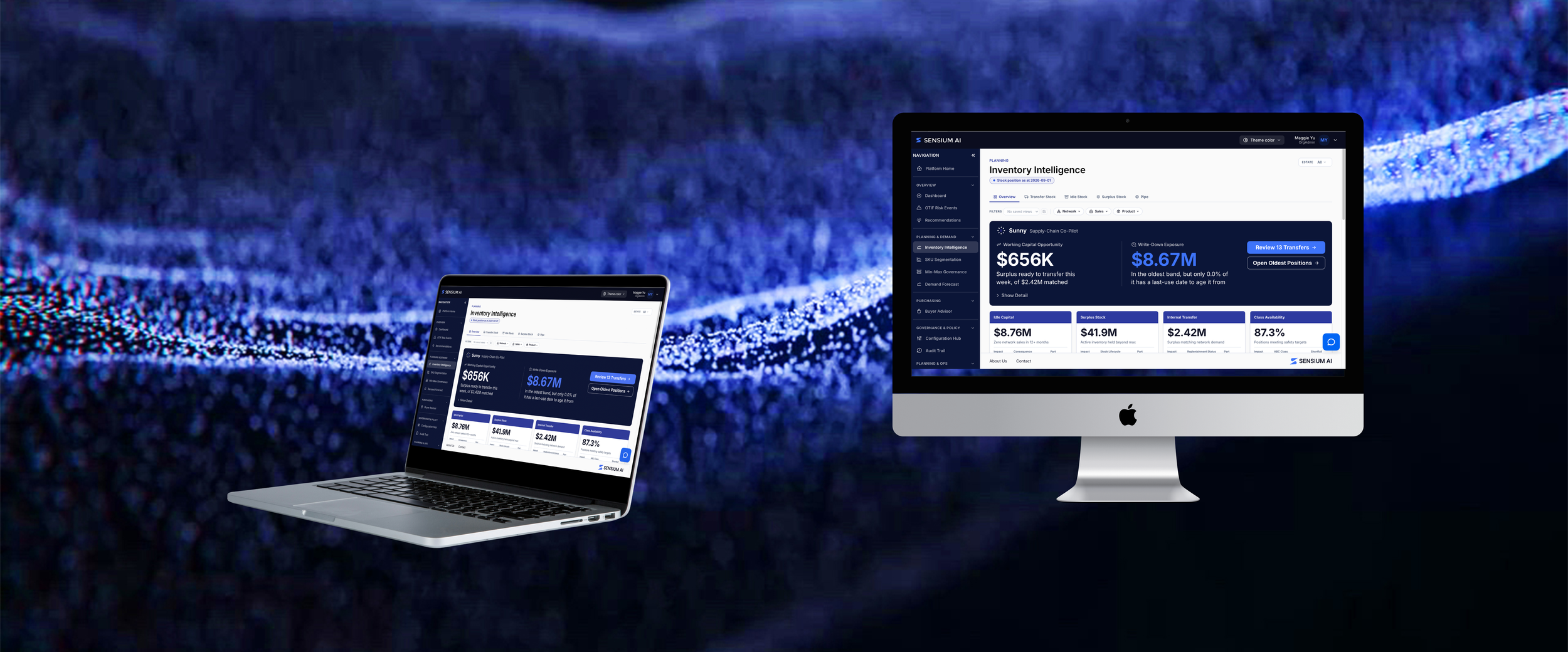
Overview
Sensium AI is an enterprise-grade AI decision and automation layer that integrates directly on top of legacy ERP systems (SAP, Oracle, Dynamics 365) for complex industrial manufacturers and distributors. As Lead UX/UI Designer, I spearheaded the end-to-end product design across the Sensium Stack, the Sensium X Command Center, and Sunny, an AI co-pilot designed to convert fragmented supply chain data into predictive, auditable workflows across demand, inventory, and purchasing.
Problem
Enterprise supply chain planners operate in high-stress, data-heavy environments dominated by rigid legacy ERP systems. While these tools store millions of rows of data, they force planners into reactive, manual workflows.
Solution
As the As The UX/UI Design Lead we focus on updates with the Sensium Ai platform and the data of our client.I communication with the development team to make corrections and push forward with corrected designs.
Role
UI/UX Design Lead
Design Process
To deliver a superior user experience, I conducted comprehensive competitive benchmarking, dissecting competitor interfaces to eliminate clutter and streamline Sensium AI’s platform navigation. I took an end-to-end, hands-on role in execution by embedding directly into the engineering workflow: building and validating front-end design iterations locally on local host, committing updates through feature branches, and deploying code directly to the main production pipeline to ensure design fidelity across every release.
Timeline
Empathize
Research on
Enterprise Supply Chain Intelligence & AI Co-Pilot Platform
AI
Be able to design with AI and edit before confirming that changes
Before starting to design the Sensium platform I began doing research on different competitors similar to the goals of Sensium. Then after gathering the data we moved forward
Research Findings
I found common themes of how certain platforms worked and what users want
Planners don't want another disconnected tool; they need clear, prioritized actions.
A clear design can easily display mass data that is given.
Speed to value matters; the interface must feel familiar enough for rapid onboarding (8–12 week client implementations).
Competitor Research
Define
The definition of Sensium is an enterprise AI decision and automation layer that sits directly on top of legacy ERP systems (such as SAP, Oracle, Microsoft Dynamics 365, and Infor SyteLine). Through understanding the different systems we are able to move forward with designing out platforms.
Key Words: AI, Systems, Organization
Sunny Card
Sensium wanted their brand to be specifically different than other companies that use AI in their system. When it came to the Sunny Card we wanted to be clear and bring specific points to the clients that are holding their information.
Sensium AI Branding
Sensium AI had a clear focus of how to be clear in their branding and to make it different from any other competitors.
Redesign Dashboard
Clients will have data given to us and it is for us to be clear and fast with how to display the information that is given to us. This would mean we are redesigning the different screens.
-
-
Ideate
During the ideation phase, I focused on turning complex supply chain data into high-density visual layouts. Synthesizing competitor research, I wireframed dashboards for the Sensium X Command Center and designed transparent interaction patterns for Sunny AI (chat and card) ensuring automated purchase and truckload drafts were simple to inspect, edit, and approve. Working directly alongside our dev team on local host, we rapidly prototyped and validated responsive UI components, ensuring seamless design-to-code fidelity before pushing feature branches to the main environment.
Key Ideas
Competitive Analysis & Screen Mapping
Audit competitor UI flows to extract interaction patterns and eliminate legacy friction.
Local host Component Prototyping
Build and stress-test high-density design layouts directly in a local development environment.
Branch Management & Main Deployment
Commit polished UI code to feature branches, conduct code/design reviews with dev leads, and merge to the main dev environment.
UX Wireframes
Prototype
The goal with the Prototype is to use AI to be able to design on the Local host that was set up as I worked with the dev team.
Steps
Added new features on pages : Sunny AI Co-Pilot, Command Center Layout, Daily update and changes as data changes
Created high-fidelity prototypes with local host
Dev-Integrated Testing : Tested UI components directly in code on local host to validate high-density table interactions, dark/light contrast, and data visualization performance before branch deployments.
Local Host Prototype
Testing Process
Task
Continue to follow up with updates that are needed to be done.
Challenge
Some users will not be happy with the design and being able to adjust and accommodate with the needs.
Reflection
Sensium is now set with their brand and when it comes to applying to their clients the whole team is able to speedily get it done.
-
Reflections
Future Steps
I am continuing to edit day to day corrections of the UI based off of the clients data that is sent.
New AI world
With the trend of AI and Design I was able to work with Sensium AI to be able to build a smooth and clear platform. Being able to start from scratch in organizing the UI for Sensium AI helped build a firm foundation with moving forward and designing prototypes with AI.